Codex vs Claude Code: which should you use in 2026?
If you're weighing Codex vs Claude Code, you've probably seen comparisons that each pick a different winner. I like both, and I use both depending on the task. I prefer Codex for browsing websites, working with apps and talking through tasks in voice mode. I use Cowork for Artifacts and visual work. Both coding agents have $20 monthly subscription routes. The setup I'd focus on is keeping the project files and instructions somewhere both can use, so switching is easy. OpenAI plans, Claude plans.
This comparison is for founders, operators and developers who want an AI agent working on real files: dashboards, reports, scripts and small apps. You'll get what each tool does, a side-by-side table of documented features, prices checked October 6, our own repair test, and how to set up one project so you can use both.
Take a dashboard. You might want Claude to work on the design, then ask Codex to open the app, check how it behaves and talk through changes. That handoff is much easier when both can find the same files, requirements and decisions.
The feature gap is smaller than it used to be. Both can read a project, change code, run checks and review the result. What matters to me is how each fits the job, and how easily I can move the work between them.
By Malak Bardor, CEO of automathiq. First published and last updated October 7, 2026. This comparison explains what the features change in everyday work, alongside my own preferences, U.S. search research and product documentation. Supporting coding experiments were run October 4. This is the first edition, and future updates will say what changed.
What are the key takeaways from Codex vs Claude Code?
- I use both, depending on the task. A shared project setup makes it easier to choose the agent that suits the next job.
- Codex is my choice for computer use and voice. I like being able to talk through work and direct what the agent does.
- I prefer Codex's writing. It sounds more human to me. Claude's sentences often feel more complicated and harder to understand.
- I use Cowork for Artifacts and design. I think Claude is a little better at design, and I like its interactive, shareable outputs.
- Both coding agents can work locally or in the cloud. Either can work alongside you or take a task away and return a result. Voice and Artifacts depend on the app and session you're using.
- Keep the instructions in one place. Shared project files and an
AGENTS.mdthat both agents can load reduce the context you have to repeat.
Not sure which one fits a task your team repeats every week? Book an intro call and bring that task. We'll tell you which tool we'd use and how we'd set it up.
What do Codex and Claude Code actually do?
Codex is OpenAI's coding agent. Claude Code is Anthropic's coding agent. Both can read files, change code, run commands and check their work, with your permissions. Codex documentation, Claude Code overview.
Take a sales report with the wrong total. You can ask either agent to inspect the calculation, explain the problem, make a change and run checks. You can also ask it to write a script, build a small app or work on the documentation around an existing project.
Both offer terminal, editor, desktop and cloud workflows. A terminal is an app for entering commands; an IDE is an editor developers use to work on code. You can choose an interface that fits how you work. OpenAI product documentation, Claude Code interfaces.
The app matters as much as the model. Codex voice is available through the ChatGPT desktop app; the terminal is a different interface. I also use Claude's broader app, including Cowork, for visual work. When I discuss that experience below, I name it separately from Claude Code. The two ecosystems include more than their coding agents.
How do Codex and Claude Code compare at a glance?
Both coding agents can work alongside you or take a task away and work on it in the background. The table sticks to documented features, current prices and our own October 4 repair test. My personal preferences come right after it.
| What you want to do | Codex | Claude Code |
|---|---|---|
| Work on files on your computer | Terminal, editor and desktop app | Terminal, editor (including JetBrains IDEs) and desktop app |
| Hand off work and close your laptop | Codex Cloud tasks, after you connect the repository | Claude Code on the web |
| Check a website or online app | Built-in browser in the desktop app, not in cloud environments | Browser pane and computer use in the desktop app, plus a Chrome extension for your signed-in browser |
| Talk through a task | Spoken conversation in the ChatGPT desktop app that can start tasks, check progress and change direction | Dictation: your speech becomes a written prompt |
| Run automatic checks (hooks) | Supported | Supported, with more documented trigger points (33 hook events, checked October 7) |
| Split a job across agents | Parallel agents when you ask or your project instructions say to, and on its own at the Ultra level | Can decide to delegate to subagents on its own |
| Share an interactive result | Builds and previews pages; ChatGPT also has Space Pages | Publishes Artifacts to a private claude.ai link on paid plans |
| Project instructions file | Reads AGENTS.md |
Reads CLAUDE.md, and AGENTS.md directly from version 2.1.277 |
| Cheapest paid plan, checked October 6, 2026 | ChatGPT Plus, $20 a month | Claude Pro, $20 a month |
| Our sales-app repair test, October 4 | Astra: 86.5 seconds. Sol: 88.5 seconds. Both passed 61 of 61 checks. | Opus 5: 52.1 seconds. Fable 5: 62.8 seconds. Both passed 61 of 61 checks. |
Sources: Claude Code capabilities, Codex cloud tasks, Codex browser, Claude desktop, Claude in Chrome, voice, Claude dictation, Claude hooks, Codex hooks, Codex subagents, Claude subagents, Claude Code Artifacts, Claude instruction files, OpenAI pricing, Claude pricing and our repair records. The repair test used one small fictional app, so the times describe those runs only. Test on your own project before relying on them.
Where my preferences come in. The table is what's documented. In my own work I prefer Codex for browser use, voice and writing. I can inspect a page beside the conversation and talk through the next change, and its explanations sound more human to me. For Artifacts and design I use Cowork, which has its own section below.
Can both keep working while your laptop is closed?
Imagine asking the agent to fix a calculation in your sales dashboard. If it runs on your computer, it needs that computer available to keep working. If you start the task in a cloud environment, it can continue there while your laptop is closed. Both Claude Code and Codex offer this option.
The cloud environment needs its own access to the project files and any tools the task uses. A file saved only on your laptop, or a website you're signed into locally, won't automatically be available there. You still come back to review the result. Claude Code on the web, Codex cloud environments.
How do automatic checks keep the agent following your rules?
Suppose you want the agent to check the dashboard's calculations every time it changes the code. You can configure a check to run at that point. These triggers are called hooks. Both tools support them. Claude Code documents more points where a hook can run: 33 events as of October 7. Claude hooks, Codex hooks. This matters if you have a detailed process you want enforced without reminding the agent each time.
How did we compare the tools?
I use these tools in my work at automathiq., where we build AI workflows for businesses. My recommendation considers four things, in order:
- The job: can the agent produce the email, code or dashboard you need?
- The interaction: can you understand its explanation and direct the next step?
- The handoff: can you check, share and maintain what it produces?
- The cost: does the plan give you enough access for that recurring job?
We also ran small coding experiments using fictional data and reviewed current official documentation. The experiments included dashboard changes, saved data, failed integrations and a repair to an unfamiliar app. The supporting records preserve the prompts, versions and results.
I use both tools, and automathiq. sells implementation services. The coding experiments used older Claude models and different tool permissions, so their results apply to those runs. My October 6 writing preference comes from my experience using the tools.
Who is Codex best suited to?
Best suited to: people who want to inspect websites alongside their conversation, talk through tasks in voice mode, and review the resulting changes in the same app.
I reach for Codex for computer use and voice. I also prefer how it writes and explains things. Astra in particular feels more like talking to a normal person.
Take a dashboard that needs checking. Codex can open a running app in its browser, inspect the result and work on a fix. Voice gives you another way to explain the problem and direct the next step. These capabilities depend on the app, platform and permissions. Codex browser, voice.
For a coding task, think of adding a CSV export with clear acceptance criteria: which fields to include, how permissions should work and what the tests should cover. Codex Cloud lets you delegate that work without preparing a local development environment. You still need to connect the repository and verify the cloud setup, dependencies and access. Browser and computer use are separate desktop capabilities; they are not currently available in cloud environments. Codex Cloud setup.
If your team already works through GitHub and pull requests, Codex also supports code review and parallel agents. A small prototype is another useful starting point, especially if your existing ChatGPT subscription includes the access you need. Give it a result you can inspect before committing to a larger project. Codex review, parallel agents.
The trade-off: I still reach for Claude when I want an Artifact or want to work on a design. Keeping the source files accessible to both makes that choice easier.
Who is Claude Code best suited to?
Best suited to: people who want detailed control over how the agent follows an existing process, including when it runs checks and how it delegates work.
Imagine a checkout bug that crosses several parts of an application. You can ask Claude Code to trace the request, explain the likely cause and propose a plan before changing files. That suits a developer who wants to discuss each decision as the investigation progresses. Its JetBrains integration also supports editors such as IntelliJ, PyCharm and WebStorm. Claude workflows, JetBrains integration.
The work can also be analysis or documentation: explaining an unfamiliar module to a new teammate, mapping dependencies or drafting API documentation from the code. Project instructions, plan mode and hooks help make the workflow repeatable. Claude best practices, hooks.
These are useful reasons to choose Claude Code, but they are shared capabilities. Codex also explores repositories, traces data flow and explains architecture. Choose based on the workflow you prefer and the result you can verify. Codex codebase exploration.
The trade-off: I prefer Codex's writing, voice and computer-use experience. A Claude Artifact also has its own hosting limits: it's a self-contained page without a backend of its own. Artifact constraints.
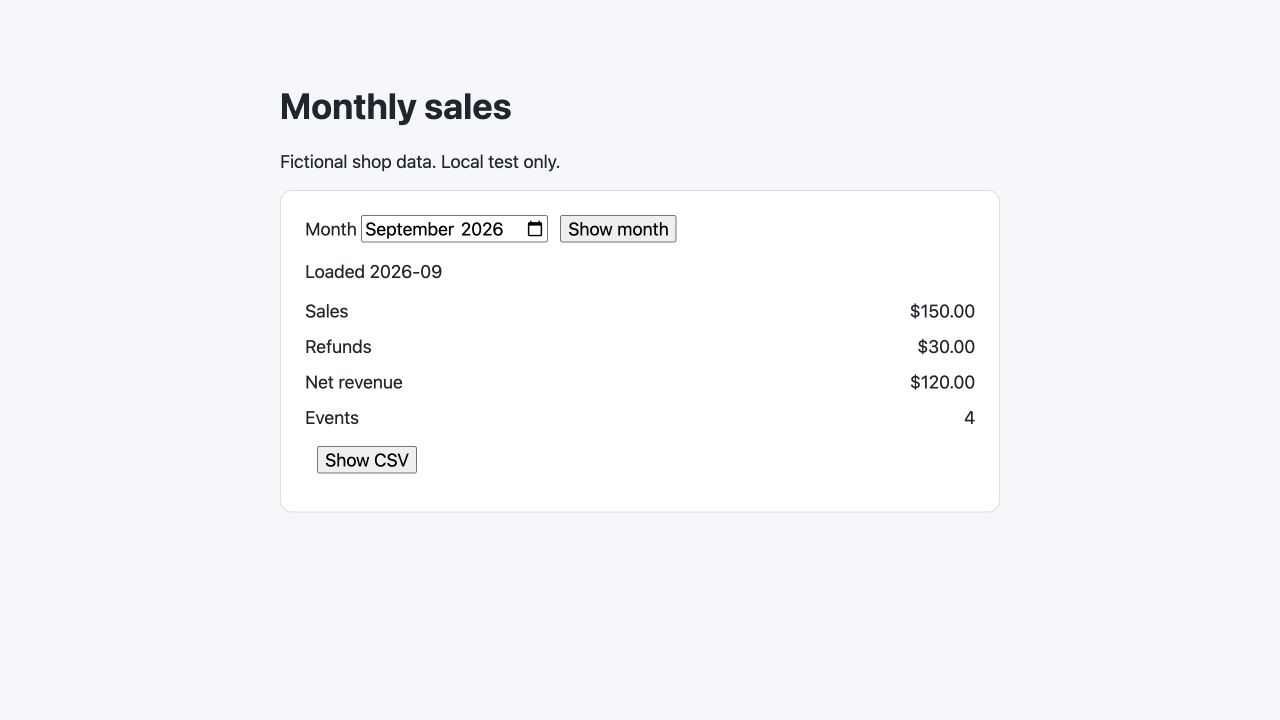
An example of a Claude-generated result: the same monthly-sales repair, with the correct totals. This screenshot shows the finished app.
How much do Codex and Claude Code cost?
ChatGPT Plus and Claude Pro both list $20 monthly plans that include their coding agents. Higher consumer plans start at $100. Prices below are published USD subscription prices checked October 6, 2026. OpenAI pricing, Claude pricing.
| Plan | Monthly price | Buying decision |
|---|---|---|
| ChatGPT Plus | $20 | Starting paid option for Codex |
| ChatGPT Pro | $100, $200 or $500 | Choose the usage tier and model access you need |
| Claude Pro | $20, billed monthly | Starting paid option for Claude Code |
| Claude Max | From $100 | More usage for heavier Claude work |
Both also offer API billing, where usage is charged separately. Subscription prices exclude any applicable taxes and local billing differences.
Buying both entry subscriptions costs $40 per month before taxes. I use both because they serve different parts of my work. If your work fits comfortably in one tool, start with that subscription and add the other when you have a regular use for it.
Which gives you more work before hitting a limit?
The useful measure is how many of your jobs you can finish before the allowance runs out. Longer tasks, larger inputs, model choice and tool use affect consumption. Both products have usage limits. OpenAI usage guidance, Claude usage guidance.
Run a normal day's work on the plan you're considering. Watch the usage display and note whether you need to wait for a reset or pay for extra usage. Someone writing short updates will use the tool differently from someone running several coding agents at once.
Which is better for coding, Codex or Claude Code?
Both are capable options for implementing features, investigating bugs and reviewing changes. I choose around the job and the working environment. Having the same source files and requirements available to both lets me ask either one to take the next step.
Our small repair experiment gives one useful example. Four models fixed the same three calculation bugs and passed 61 independent checks. The app had counted pending sales, duplicated events and handled partial refunds incorrectly. The correct September result was $150 in sales, $30 in refunds and $120 net. Repair inputs and results.
For your own project, ask either agent to explain the change and show how it checked the result.
Which is faster for coding?
Speed changes with the task, model and reasoning setting. Compare the model you'll actually use. OpenAI models, Claude models.
In the October 4 repair runs, the Claude models finished sooner: Opus 5 in 52.1 seconds and Fable 5 in 62.8, against 86.5 for Astra and 88.5 for Sol. The earlier pilot split. Fable 5 was fastest both to build the starting dashboard and to add a client filter, while Opus 5 was slowest at adding the filter. All four passed the browser checks each time. Repair timings, pilot timings.
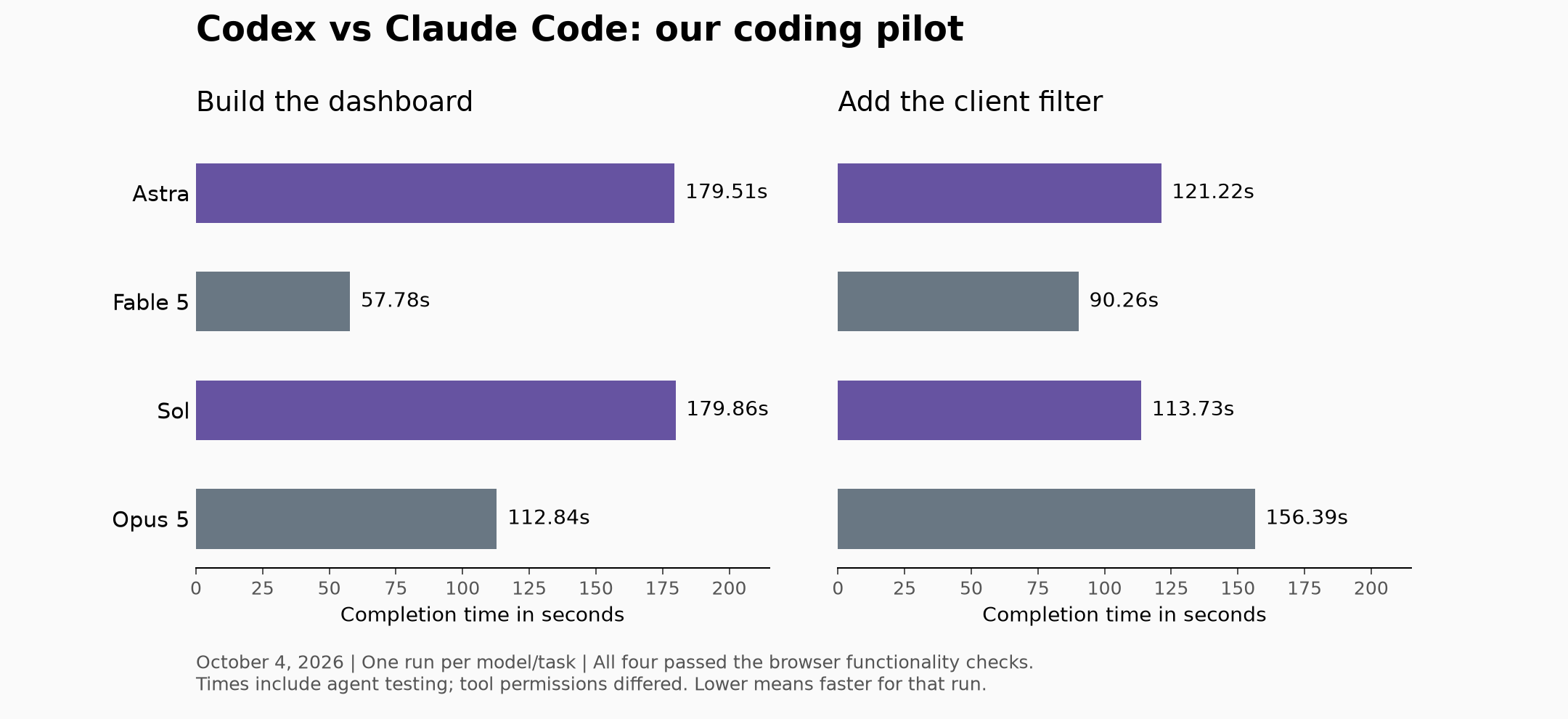
One run per model and task, on fictional data. Times include each agent's own testing, and tool permissions differed, so read them as observations from these runs.
When choosing for work, count the time it takes to get a result you can use, including your review and revisions. An answer that's quick to generate can still take time to understand or correct.
Which writes better, Codex or Claude Code?
As of October 6, I prefer how Codex writes. It sounds more human to me, and I find it easier to understand. Claude often makes its sentences more complicated than they need to be.
That matters when I'm reading an explanation, working on an article or deciding what to change next. I want the point to be clear on the first read. Codex's style suits me better.
Give either tool examples of your voice and the approved facts. For articles, supply your experience and sources before asking for a draft.
Why is Codex voice mode a differentiator?
In the ChatGPT desktop app, voice can coordinate Codex work. You can start a task, hear responses, check progress and change direction without returning to typing. I like having that option while working with the agent. Codex voice.
Claude Code supports dictation: your speech becomes text in the prompt. Claude's broader chat product also has voice, so the distinction here is how voice works inside the coding-agent session. Claude Code dictation, Claude plan features.
For someone who likes explaining a job aloud, this is a strong reason to use Codex. It is an app feature, so check availability in the account and platform you'll use.
Why do I use Cowork for Artifacts and design?
I use Cowork when I want an Artifact or a visual result, and I think Claude is a little better at design. A dashboard, a small planning tool or a visual explanation gives me something I can inspect and refine.
Artifacts are also available from Claude Code in eligible sessions. Take a comparison dashboard you want a colleague to explore. Claude Code can publish it to a private claude.ai URL, update it and provide sharing controls. Claude Code Artifacts.
Publishing from Claude Code requires a paid Claude plan and a session signed into claude.ai. API-key sessions cannot publish Artifacts, and organization settings can restrict access.
That is useful when the deliverable is a self-contained page. The recipient can open a link instead of setting up your local project. The Artifact has no backend of its own, so a full application needs a separate deployment.
Codex can also build interactive pages and preview them, and ChatGPT offers Space Pages. Claude's advantage here is the specific Artifacts publishing workflow. Codex browser and previews, ChatGPT Pages.
If you want a dashboard connected to live business data, book an intro call about building and maintaining that dashboard with automathiq.
Do both have browser and computer use?
Yes. Codex offers browser and computer-use capabilities. Claude Code desktop has a Browser pane for interacting with sites, computer use and a Chrome extension for existing browser sessions. OpenAI computer use, Claude desktop.
I find Codex better for browser and computer use in my own work. I can inspect a page beside the conversation, ask it to check a button or form, then talk through a change in voice mode. Your choice should also account for which browser profile, apps and permissions the agent needs. Reading a public page is a different setup from working in an account you are already signed into.
What are people on Reddit saying about Codex vs Claude Code?
People describe different preferences depending on the work. In a discussion about marketing copy, u/Leckatall wrote:
In general I find the writing of Codex much much better.
That matches my current preference. Read the original discussion.
In another comparison, u/CyphronGaming reported better results from Codex on UI work, auditing and bug fixing, and found it slow to finish. Replies describe the opposite experience on other tasks, and the commenter used different subscription tiers for each tool. These are individual experiences. Read the comparison and replies.
How do you set up a project so you can use both?
Keep the work and its instructions in a shared project. GitHub can hold the code, approved reference files and decisions so either agent can continue from the latest version. This is the setup behind the agents that I'd focus on building. To start from a template, download our AGENTS.md starter.
For example, Claude could work on a dashboard's design, then Codex could check the running page. Save the editable source and a short note about what changed before switching. A published Artifact link by itself doesn't give the next agent all the project files.
- Keep one project repository. Use a private GitHub repository for the files you intend to share. Leave passwords, API keys and unapproved customer data out of it.
- Keep one set of instructions. Put the project purpose, folder locations, writing or design rules, and check commands in
AGENTS.md. Have Codex and Claude Code load that same content. In Cowork, provide the relevant files as context and check what it has read. - Save a handoff note. Record what changed, what was checked and what still needs work. Commit and push the work before switching between separate checkouts, then pull the latest version where the next agent runs. Give Cowork access to the relevant project folder too.
- Check the handoff. Ask the next agent to summarize the instructions and current state before continuing. Let one agent edit a given set of files at a time, or use separate branches and review the changes before combining them.
GitHub carries the files you save to it. Chat history, automatic memories, logged-in browser sessions and tool connections need their own setup. Keep the decisions the next agent needs in project files, and connect each tool to the apps it will use.
Can you use just AGENTS.md now?
Yes, in supported Claude Code sessions. Anthropic documents direct support from version 2.1.277. By default, an existing CLAUDE.md, .claude/CLAUDE.md or CLAUDE.local.md in the working directory or its parents takes priority. Versions, settings and plugin availability matter. Claude instruction-file documentation, checked October 6.
Codex reads AGENTS.md as project guidance. For a compatible setup across older Claude Code sessions, keep the shared rules there and put this line in an adjacent CLAUDE.md:
@AGENTS.md
That imports the rules into Claude's context. It avoids maintaining two full copies that can drift apart. Check Claude's /context view and ask Codex which instructions it loaded. Claude imports, Codex instructions.
What other coding agents should you compare?
Several of the pages ranking for this comparison also bring up two other tools:
- Cursor is an AI code editor. It suits people who want the agent inside the editor where they already write code. Cursor
- GitHub Copilot is GitHub's AI coding assistant. It works in popular editors and on GitHub itself, which suits teams that already review work through pull requests. GitHub Copilot
We didn't test either one, so this page doesn't rank them. The three questions below work for them too.
How do you choose between Codex and Claude Code?
Ask three questions, in order:
- What does this task need? A shareable visual result points to an Artifact. Browsing a site and talking the work through points to Codex. For a defined feature, cloud delegation may suit you; for a bug investigation, you may want to stay in the terminal or editor and discuss the changes. Both can handle either kind of coding work.
- Can the agent reach the latest project files and instructions? Check the project folder, the saved decisions and any tools it needs.
- What will I review before handing the work over? Check the result, save the changes and leave a clear next step.
My conclusion is that I use both. I want to choose the tool that suits the task without having to explain the whole project again. A shared repository, shared instructions and a useful handoff note make that much more practical.
What else do buyers ask about Codex and Claude Code?
Are Codex and Claude Code the same?
No. Codex is OpenAI's coding agent, while Claude Code is Anthropic's. Both can work on files and use tools, but their models, interfaces and subscription access differ.
Can Claude Code be used with Codex?
Yes. Keep the latest source files, requirements and handoff notes available to both, then choose the agent for the next task. Shared instructions carry the project rules; each app still needs its own tool access.
Is there a better coding AI than Claude?
Codex is a useful alternative to Claude Code for coding work. I use both and choose by task, including whether I want voice, computer use or an Artifact as part of the workflow.
Is Codex really good for coding?
Codex can implement features, investigate bugs and review code. In our small sales-app repair, both Codex models passed all 61 independent checks. The repair record gives the scope of that result.
Which is better, Codex Plus or Claude Pro?
“Codex Plus” usually means Codex access through ChatGPT Plus. Both Plus and Claude Pro list $20 monthly plans. Start with the one that matches your most frequent task, and add the other when you have a regular use for it.
How do I start a project both agents can use?
Put an AGENTS.md file at the root of the project with what it does, how to run its checks and the rules to follow. Add a CLAUDE.md containing @AGENTS.md so older Claude Code sessions load the same rules, then ask each agent to summarize the instructions before it starts. Download our AGENTS.md starter.
Is Claude Code or Codex free?
OpenAI lists limited Codex access on Free, with model and availability restrictions. Claude Free includes chat and Artifacts; Claude Code is included in paid plans. Current OpenAI plans, Claude plans.
Want help putting either tool to work in your business?
At automathiq., we build AI workflows around the apps a business already uses. That includes organizing the project files and instructions, connecting the tools, and making the work easy for your team to review and continue.
Book an intro call about a workflow you want built. Bring an example of the work, the apps involved and what a correct result looks like. If neither tool is the right fit for that job, we'll tell you.
About the author: Malak Bardor runs automathiq., which provides outbound and AI implementation services. This comparison draws on her experience with the tools, current official documentation and supporting coding experiments. Follow automathiq. on LinkedIn.